Litematica viewer online: Minecraft schematics in 3D, layer by layer
A free online Litematica viewer and Minecraft schematic viewer: open a .litematic, .schem, .schematic or .nbt in 3D with Minecraft's own textures and build it in survival layer by layer, with each layer's materials beside it. No mods, no install.
Litematica viewer online: build in survival layer by layer, no mods
View any .litematic, .schem, .schematic or .nbt in 3D right in your browser, with Minecraft's own models and textures: stairs, fences, doors, glass, leaves, water, chests, signs, beds, heads… just like in game.
It's an online Litematica viewer made for survival building: no need to install Fabric, Litematica or any other mod, or to have the game open to look at the schematic.
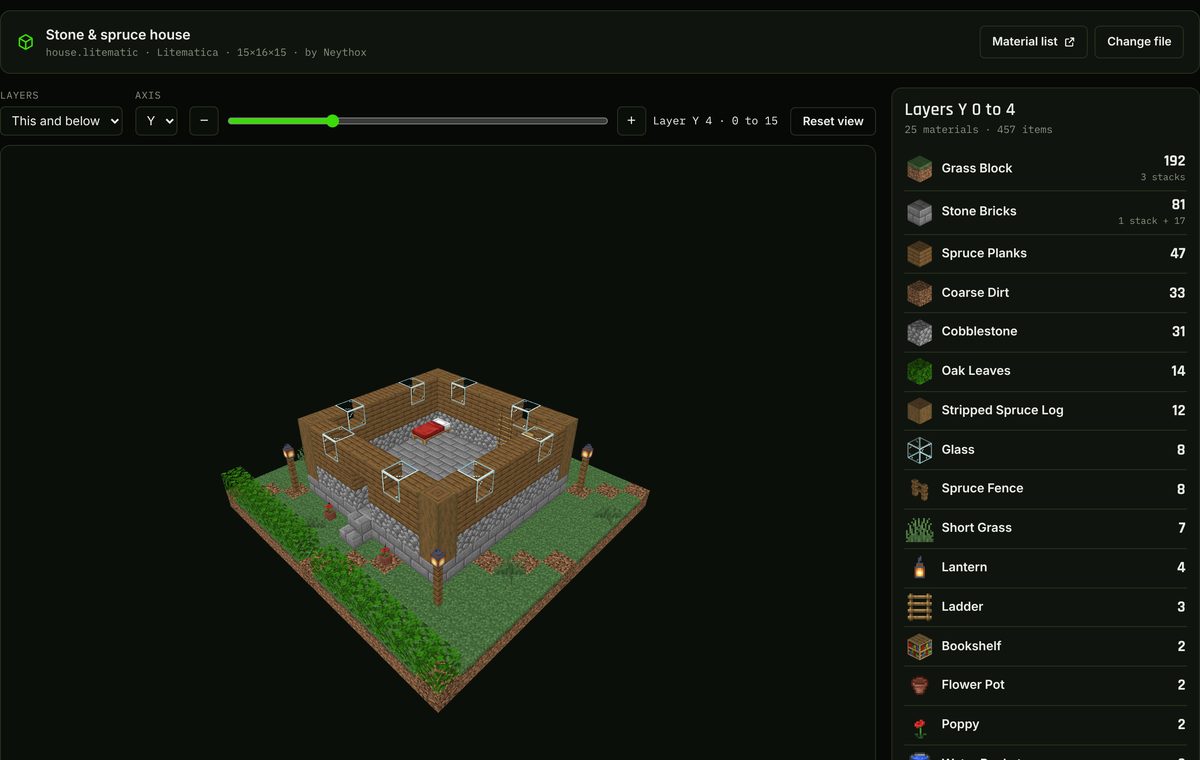
Build it the way you would with Litematica: show a single layer, this layer and below, this layer and above or a range, on the Y, X or Z axis, with the materials needed for exactly what you're looking at right next to it. Ideal for following a schematic on a server without mods, or from your phone next to your PC.
How to build in Minecraft without Litematica
Litematica is great, but you can't always use it: vanilla servers, Realms, new versions without mods, consoles… With this viewer you can follow any build block by block without installing anything. Here's how:
Building without Litematica, step by step
Get the schematic. A community .litematic (Discord, forums, technical creators), one you saved yourself with Litematica, WorldEdit or Axiom, or a structure block export (.nbt).
Gather the materials first. Open the material list to get the totals in stacks and shulkers, so you don't run out halfway.
Mark the origin in your world. Place a reference block on the corner where the build starts: that's X 0, Y 0, Z 0 in the viewer.
Go layer by layer. Choose “Single layer” on the Y axis and start at layer 0. Hover (or tap) a block to see what it is and its X/Y/Z position, then just count from your reference block.
Move up and repeat. “This and below” lets you check that what you built lines up, and the materials for the layer you're viewing are always next to it.
How to learn to build in Minecraft
The fastest way to learn to build is to take other people's builds apart. Open a house, castle or farm you like and go through it layer by layer: you'll see how roofs are made with stairs and slabs, how walls get depth, which block palettes work together and how redstone is hidden.
Rotate it, zoom into the details and use “This and above” to see the inside from below. Then try to recreate it in creative or survival: copying good builds is how most builders learn.
How to make big and massive builds in survival
A huge build becomes manageable once you split it up. First, check the total materials in the list and plan how many shulkers of each block you'll need.
Then work in sections: “Range” mode shows only a few layers (for example, 0 to 9) with their materials, and on the X and Z axes you can build wall by wall or section by section. Put reference blocks every 10 or 16 blocks in your world and it's much harder to get lost.
How to make difficult builds and redstone
In technical builds the hard part is placing every block in the right spot, facing the right way: observers, pistons, hoppers, repeaters, rails… The viewer draws the models just like in game, so “Single layer” shows which way each one faces.
If something isn't clear, switch the layer axis (X or Z) to see the mechanism from the side, or use “This and below” to understand what sits right under each piece.
How to build farms without Litematica
Technical farms (iron, mob, gold, trading, tree farms…) are usually shared as .litematic files. Open them here and build them layer by layer: the viewer shows the blocks in each layer, and the material list also tells you which mobs it needs (villagers, zombies, etc.), what goes in each chest and hopper, and the text on signs.
Tip: check which version the farm was made for. Many farms stop working when Minecraft updates.
Building without mods: vanilla, Realms, consoles and Bedrock
The viewer runs in the browser on your computer, phone or tablet, so you can keep it open next to you while you play on PC or console, on a vanilla server or on Realms, without installing Fabric or any mod.
Schematics are Minecraft Java files, but most blocks are the same in Bedrock, so you can copy houses and decorative builds by hand. Redstone and farms work differently in Bedrock: for those, look for designs made for Bedrock.
What you can do
Just like in game
Official models and textures from the latest Minecraft Java version, with tinted grass and leaves, see-through water and glass, and chests, signs, beds and heads with their real shape.
View Litematica by layers
All, single layer, this and below, this and above or a layer range, on the Y, X or Z axis. With the slider, the buttons or Page Up / Page Down.
Materials for each layer
Next to the view, the items needed for the layers on screen, in stacks: you know what to bring before building each layer.
What every block is
Hover a block to see its name and its coordinates inside the schematic.
Rotate, zoom and pan
Drag to rotate, scroll or pinch to zoom and right-click or two fingers to pan. The camera follows the layer you're on.
Linked to the material list
One click opens the same file in the material list: stacks, shulker boxes, containers, signs and mobs.
Who it's for
Survival without mods
Build a schematic in survival layer by layer on a server where Litematica isn't allowed, in vanilla, or on a version with no mods yet.
Technical Minecraft
Look inside a downloaded farm (redstone wiring, observers, hoppers) layer by layer before building it.
Building
Study a build section by section and carry only the blocks for the layer you're on.
Sharing and teaching
Take a quick look at a schematic someone sent you, without opening the game, even on your phone.
Supported formats
It opens the most common Minecraft Java schematic formats from any version.
Litematica: .litematic, with all its regions.
WorldEdit, FAWE and Axiom: .schem (Sponge v1, v2 and v3).
MCEdit and Schematica: .schematic (1.12 or earlier).
Structure blocks: .nbt.
Everything is read in your browser: the file isn't uploaded anywhere.
Ideas
Build a farm in survival layer by layer on a server without mods.
Use it as a Litematica alternative when you can't install mods (Realms, vanilla servers, a friend's setup).
See inside a redstone machine without breaking it.
Check what's in a schematic before pasting it with Litematica or WorldEdit.
Keep it open on your phone while you build on your PC.
How it works
Drop your .litematic, .schem, .schematic or .nbt on the page.
Rotate the build with your mouse or finger and zoom into what you want to see.
Choose “Single layer” and go up layer by layer with each layer's materials beside it.
Open the material list for the totals, shulker boxes and containers.
Litematica viewer FAQ
How can I view a litematic without Minecraft?
Drop the .litematic file on this page and you'll see it in 3D straight away, with Minecraft's textures, without opening the game or installing Litematica.
Is this a free online Litematica viewer?
Yes. It's a free online Litematica viewer and Minecraft schematic viewer: no account, no install and no need to have Minecraft open.
How do I build in Minecraft without Litematica?
Open the schematic in this viewer, place a reference block in your world as the origin and go layer by layer with “Single layer”: pointing at a block shows what it is and its X/Y/Z position, and the materials for that layer are right next to it. It works on any server, even vanilla or without mods.
How can I learn to build in Minecraft?
By copying good builds. Open other people's houses, castles or farms here and go through them layer by layer to see how roofs, walls and details are made, then try to recreate them in creative or survival.
How do I make big builds in survival without getting lost?
Split it up: check the total materials in the material list, work in layer ranges or wall by wall (X and Z axes) and place reference blocks every 10 or 16 blocks in your world.
How do I build a farm without mods?
Open the farm's .litematic here and build it layer by layer; the material list also tells you which mobs it needs, what goes in each container and the text on signs. Make sure the farm is for your Minecraft version.
How do I view a Litematica schematic layer by layer?
Choose “Single layer” and go up: you see only that layer, with the materials it needs beside it. You can also show this and below, this and above or a range, on Y, X or Z.
Does it look like the game?
It uses Minecraft Java's official models and textures, so blocks have their real shape and look. It doesn't reproduce torch lighting or smooth shadows, and entities (item frames, armor stands, mobs) aren't drawn.
Does it open WorldEdit schematics (.schem)?
Yes: WorldEdit, FAWE and Axiom .schem files (Sponge v1, v2 and v3), legacy MCEdit/Schematica .schematic files and structure block .nbt files, as well as .litematic.
Is my file uploaded anywhere?
No. It's read in your browser and never leaves your device.
Does it work for Minecraft Bedrock or consoles?
You can keep the viewer open on your phone or tablet while you play on console. Schematics are Java files, but most blocks are the same in Bedrock, so you can copy decorative builds by hand; redstone and farms work differently in Bedrock.
Does it work on mobile?
Yes: rotate with one finger, zoom and pan with two.
How big can the schematic be?
Files up to 200 MB. Huge builds (over about 48 million blocks of volume) aren't shown in 3D, but their material list still works.
Need the full material list?
The material list gives you the totals in stacks and shulker boxes, what goes in each container, the sign text and the mobs.
Free online Litematica viewer and Minecraft schematic viewer: open .litematic or .schem files in 3D and build them in survival layer by layer, no mods.