Minecraft tool
Minecraft material list from your litematic or schematic
Drop a .litematic, .schem, .schematic or .nbt and get every material you need to build it in survival, in stacks and shulker boxes, plus what goes inside each container, the sign text and the mobs. Free, in your browser, nothing uploaded.
About the material list
The Minecraft material list from your litematic or schematic
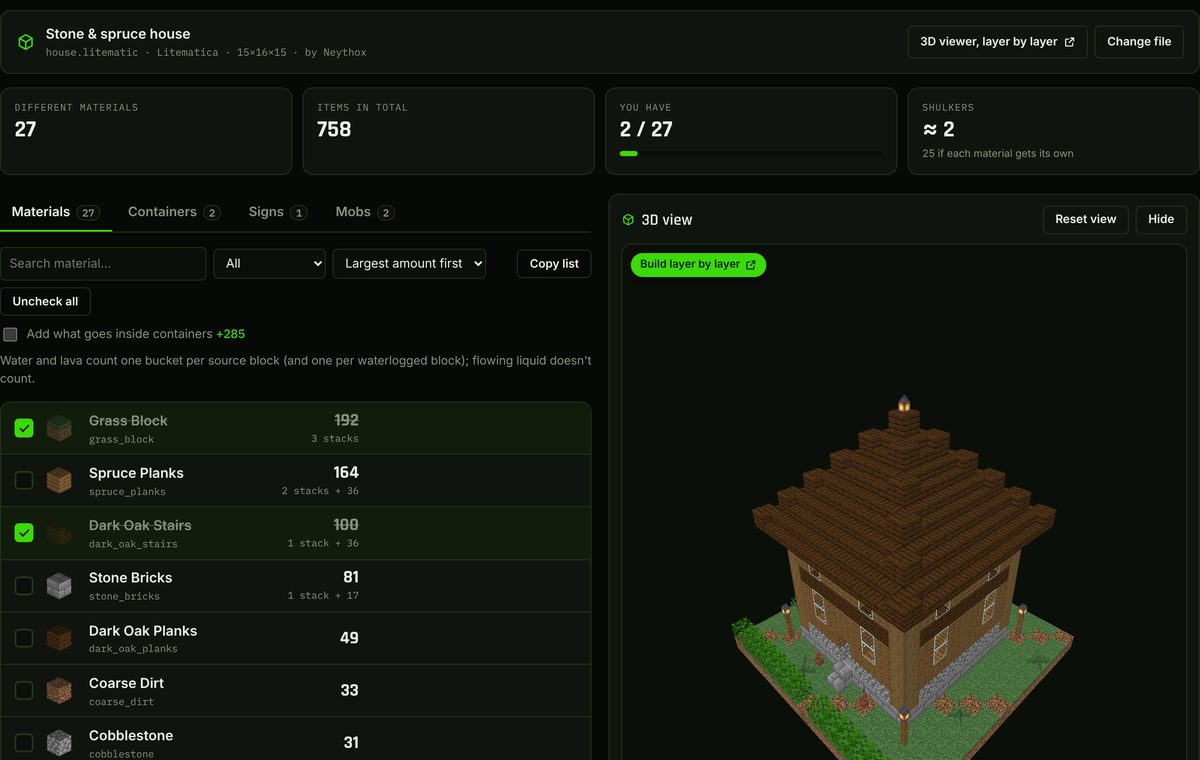
Drop a Litematica file (.litematic), a WorldEdit file (.schem), an old .schematic or a structure (.nbt) and instantly get everything you need to build it in survival: every material with its amount, in stacks and shulker boxes, what goes inside each chest, hopper or dispenser, the sign text and the mobs it contains.
It isn't a raw block count: every block becomes the item you need in your inventory. A wall torch is a torch, a double slab is two slabs, the top half of a door doesn't count, water and lava are buckets, a potted flower is a pot plus a flower and crops are seeds. It runs in your browser, with nothing to install, no account and no upload.
Everything it tells you about your schematic
Materials ready to gather
Every block turned into the item you need, with its icon and name, sorted by amount or name, with search and checkboxes to tick off what you already have.
Stacks and shulker boxes
How many stacks it is (16 for signs and banners, 1 for beds or buckets) and how many shulker boxes you need, with a preview of the partly full one just like in game.
What goes inside each container
Chests, barrels, hoppers, dispensers, droppers, furnaces, shulker boxes inside chests… each with its position and its slots, with identical ones grouped: perfect for sorter filters.
The sign text
Every sign with its front and back text, its dye color and whether it glows. Click a line to copy it and paste it in game.
The mobs in the build
Villagers with their profession, zombies, pillagers, golems… grouped and with their positions: ideal for iron, trading or raid farms.
3D view of the build
The build in 3D with Minecraft's textures next to the list, to rotate it and see what each block is. To build it layer by layer, use the 3D viewer.
Who it's for
Technical Minecraft
Gather the materials for a farm from a tutorial or a technical server before you start building, including its containers and villagers.
Building and decoration
Work out the blocks for a big build in stacks and shulker boxes so you know how much to farm or buy.
Survival and Hardcore
Arrive at the build site with everything in your inventory: no trips back for what was missing.
Servers and SMPs
Split the gathering with the list pasted in Discord and tick off what you already have.
Supported formats
It reads the most common Minecraft Java schematic formats from any version: old ones with numeric ids are converted to today's block names.
- Litematica: .litematic, with all its regions.
- WorldEdit, FAWE and Axiom: .schem (Sponge v1, v2 and v3).
- MCEdit and Schematica: .schematic (Minecraft 1.12 or earlier).
- Structure blocks: .nbt.
- Up to 200 MB per file; what you tick off is saved in your browser for each file.
Ideas
- Get the material list of an iron, gold or raid farm before building it.
- Find out how many shulker boxes of blocks a big build needs.
- Fill the filters of an item sorter without opening the schematic in game.
- Copy the text of every sign in a base instead of typing it.
How it works
- Drop your .litematic, .schem, .schematic or .nbt on the page (or click “Choose a file”).
- Tick off the materials you already have and see how many stacks and shulker boxes are left.
- Check what goes in each container and copy the sign text.
- To build it layer by layer, open it in the 3D viewer with one click.
Material list FAQ
How do I get the material list of a Litematica file?
Drop the .litematic on this page. In seconds you get every material with its amount, in stacks and shulker boxes, without opening Minecraft or installing Litematica.
Is my schematic uploaded anywhere?
No. The file is read in your browser and never leaves your computer or phone. It's only stored in the browser itself so you can open it in the 3D viewer or after reloading.
Which formats does it accept?
.litematic (Litematica), .schem (WorldEdit, FAWE, Axiom), .schematic (MCEdit and Schematica, 1.12 or earlier) and .nbt (structure blocks) from Minecraft Java.
How many shulker boxes do I need for my build?
For every material the list shows how many full shulker boxes you need and whether one is partly full, with its contents. At the top there's also the total for everything you still need.
Why don't the amounts match the block count?
Because it counts the items you need, not blocks: two slabs per double slab, one door per door (not per half), a bucket per water or lava source block, seeds for crops…
Does it include what goes inside chests?
Yes. The Containers tab shows what goes in each chest, hopper, dispenser or shulker box, and a switch adds it to the material list.
Is it free? Do I need an account?
It's free and needs no account: it works right in your browser, on mobile too.
Want to build it layer by layer?
The 3D viewer shows the build with Minecraft's textures, layer by layer like in Litematica, with the materials for each layer.
Drop your .litematic, .schem or .schematic and get the Minecraft material list in stacks and shulker boxes, what goes in each chest, the sign text and the mobs. Free, nothing uploaded.
Open the material list →