Minecraft tool
Minecraft item list: every item and block, by version
The complete list of Minecraft Java items and blocks as an interactive checklist. Track what you've collected and what you farm, see what every update added, and share the list with your server or friends. Free, in your browser.
About the list
The most complete and useful Minecraft item list
Every Minecraft Java item and block in one interactive list: every entry in the latest official release, sorted by the same categories as the creative inventory, with their icon, their name in English and Spanish, their ID (minecraft:…) and the version they were added in.
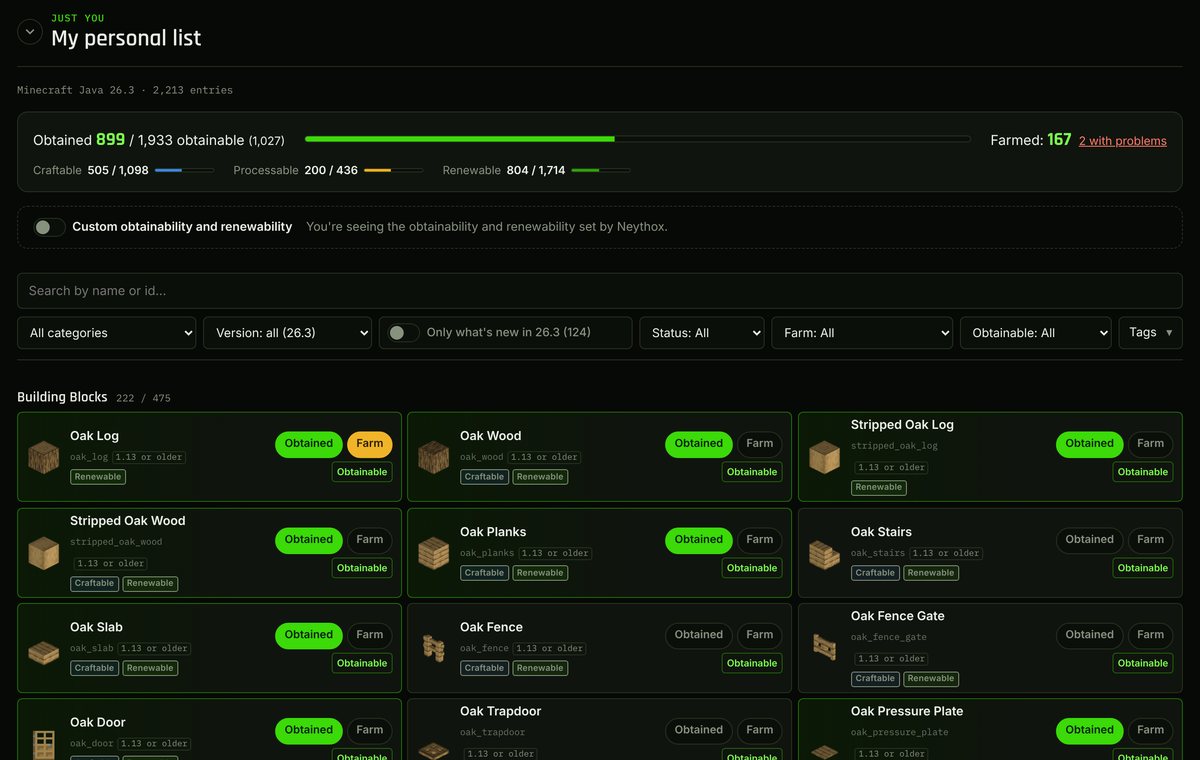
It's not just a list to look things up: it's your Minecraft checklist. Mark what you've already got and what you have a farm for, see how much is left, and find out what every update brings. It even includes blocks without an item (planted crops, portals, fire…), spawn eggs and operator blocks, so nothing is missing.
Everything you can do
All of Minecraft, version by version
Filter by version to see what each update added, from 1.13 to the latest, or show only what's new in the most recent version.
Your item checklist
Mark every item as obtained and whether you have a farm for it. Progress is counted for you: obtained out of obtainable, craftable, processable and farmed.
Obtainable, craftable, processable, renewable
Tags that tell you what can be obtained in survival, what's crafted, what comes out of a furnace or another process, and what's renewable, with the reason why.
Real search and filters
Search by name (English or Spanish) or by ID, and filter by category, version, status, farm, obtainable and tags. Your filters are remembered.
Saved to your account
Your list is stored in the cloud and looks the same on your PC and your phone, with nothing to install.
Connected to your farms
Link it to the Project manager: whatever your farms produce gets marked automatically, and you can see if a farm you rely on has stopped working.
For every way of playing Minecraft
Technical Minecraft
Keep track of what you farm and what's left to automate, check what's renewable and why, and run a technical SMP's inventory together.
Building and decorative Minecraft
Find every decorative, colored and natural block with its icon and ID to plan block palettes and know what you have to build with.
Survival and Hardcore
Your world's progress at a glance: what you've got, what's left and what every update brings so you can keep going.
Collecting challenges
The perfect checklist to collect every item or every block in Minecraft, or to build a museum with one of each.
For servers and friends playing in the same world
With a shared list, your whole server or group of friends works on the same list: everyone marks what they get and the others see it instantly. It's the easiest way to track a world's progress together.
- Invite people by email or by their Twitch or YouTube name; each person gets a notification to accept.
- Per-person permissions: who can mark items, who can invite and who sets what's obtainable on your server.
- Activity history: who marked what, and when.
- Custom obtainables: if something can't be obtained on your server (or can), the list adapts.
- Links to a shared Project manager board: the server's farms mark their materials on the list.
Ways to use it
- Take on the challenge of collecting every item or every block in Minecraft.
- Keep a technical SMP's inventory: what you have, what's farmed and what's missing.
- Plan a museum or storage hall with one of every block.
- Find out what each new version adds and what you still need from it.
How to get started
- Create a free account or sign in with Twitch or YouTube.
- Mark what you already have and what you farm on your personal list.
- If you play together, create a shared list and invite your group.
- Link it to the Project manager so your farms mark what they produce.
Browse every Minecraft item
Minecraft item list FAQ
How many items and blocks are there in Minecraft?
Over 2,000, and the number grows with every update. The list has all of them: items, blocks, spawn eggs, operator blocks and blocks without an item, and it updates itself when a new Minecraft Java version comes out. The exact total for the current version is shown at the top of the list.
Can I see which items were added in each Minecraft version?
Yes. Every entry shows the version it was added in, and the version filter lets you view a specific update, from 1.13 to the latest, or only what's new in the most recent one.
Is it free?
Yes, the item list is free. You only need an account to save what you mark; you can sign up with your email or sign in with Twitch or YouTube.
Does it work for a server or for playing with friends?
Yes. With a shared list you all mark the same list and see each other's progress instantly, with per-person permissions, invitations and a history of who marked what.
What do obtainable, craftable, processable and renewable mean?
Obtainable: it can be obtained in survival. Craftable: it's made at a crafting table. Processable: it comes out of a furnace, smoker, blast furnace or another process. Renewable: it can be obtained without limit; every entry explains why.
Is it for Java or Bedrock?
The list is for Minecraft Java Edition: the items, IDs and versions are Java's.
Want to organise your farms and builds too?
The Project manager stores every farm with its coordinates, what it produces per hour and its status, and has a task board for your server.
Every Minecraft Java item and block by version in an interactive checklist: mark what you have and farm. For technical, building and server play. Free.
Open the item list →