Minecraft tool
Minecraft project manager: your farms, builds and tasks
Keep every farm and build in your Minecraft world with its coordinates, what it produces per hour and its status, and plan what's left on a task board. Made for single-player and for servers and friends playing together. Free, in your browser.
About the manager
The most complete project manager for Minecraft
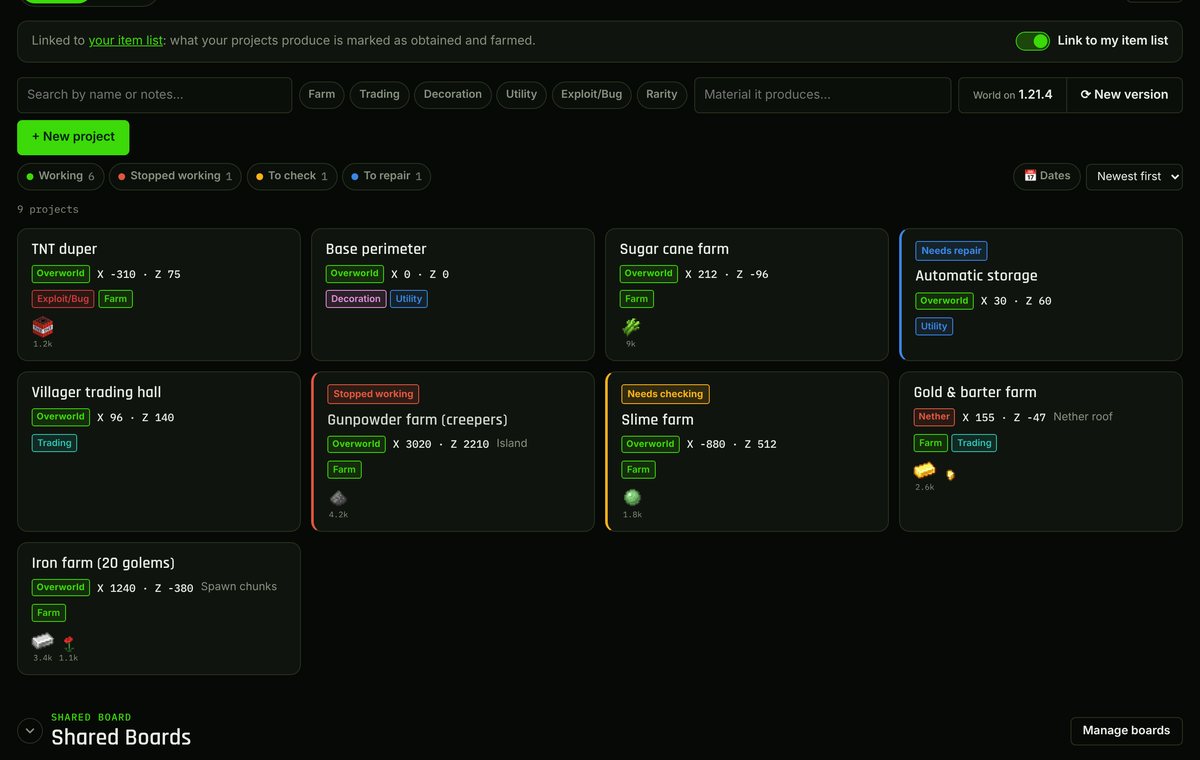
A portfolio of everything you've built in Minecraft: every farm, machine and build in your world with its coordinates, the dimension it's in, what it produces per hour, its status and how it was made. All in one place, instead of scattered across screenshots, notes and Discord messages.
And for what's still to do, a task board like the ones professional teams use: BLOCKED, TO DO, IN PROGRESS and DONE columns, assignees, subtasks, materials and comments. For playing solo or organising a whole server.
Everything you can do
A catalog of your builds
Every project with X/Z coordinates in the Overworld, the Nether or the End (several locations if needed), categories, notes, links to tutorials and start and end dates.
Farms with production per hour
Record which materials each farm produces and how many per hour. Search by material to instantly find the farm that gives you what you need.
The status of every project
Working, stopped working, needs checking or needs repair, with the last version it worked in.
Ready for every new version
Set the version your world is on and, when you update, mark what to check by category in one click and create the check tasks.
Task board
Drag tasks between columns and give them a type (new build, fix, modification, demolition), subtasks, materials needed, comments and a change history.
Connected to the item list
Whatever your farms produce is automatically marked as obtained and farmed on your Minecraft item list.
For every way of playing Minecraft
Technical Minecraft
All your farms with their rates per hour, their status and the last version they worked in, ready to check at every update.
Building and decorative Minecraft
Plan big builds in phases with tasks, subtasks and materials needed, and keep track of where each one is.
Survival and Hardcore
Your world's memory: what you've built, where it is and what's left to do, without relying on screenshots or loose notes.
Servers and SMPs
A shared board for the whole server: who's in charge of what, which farms exist and what's missing, with notifications and history.
For servers and friends playing in the same world
With a shared board, the whole server manages the same projects and the same task board: where each farm is, who's in charge of what and what's left to do. The tool to run an SMP like a team.
- Invite your group by email or by their Twitch or YouTube name.
- Per-person permissions: who can edit and who can invite.
- Assign tasks and comment on them; everyone gets a notification.
- Activity history and a trash bin to recover what was deleted.
- Linked to a shared item list: the server's farms mark what they produce.
Ways to use it
- Keep track of every farm on a technical SMP and what each one produces.
- Plan mega-projects (perimeters, bases, storage halls) by tasks and materials.
- Check which farms still work after a Minecraft update.
- Keep your single-player world's portfolio: everything you've built, where and how.
How to get started
- Create a free account or sign in with Twitch or YouTube.
- Add your projects to My Board with their coordinates and what they produce.
- Organise what's pending on the task board.
- If you play together, create a shared board and invite your server.
Minecraft project manager FAQ
What is the Minecraft project manager?
A free web tool to store everything you build in Minecraft (farms, machines, builds) with its coordinates, what it produces and its status, and to organise what's pending on a task board.
How do I organise the farms on my Minecraft server?
Create a shared board, invite the server and add each farm with its coordinates, its dimension and the materials it produces per hour. Then you can search by material to find which farm gives what and see which ones are working.
Can I use it with friends or on a server?
Yes. Shared boards have common projects and a common task board, per-person permissions, invitations, assigned tasks, comments, notifications and an activity history.
Is it free?
Yes. You only need an account; you can sign up with your email or sign in with Twitch or YouTube.
What happens when a new Minecraft version comes out?
With “New version” you choose which projects to check (by category or one by one), they're set to “needs checking” and, if you want, a check task is created for each one on the board. The world version is updated automatically.
Does it work for Java and Bedrock?
Projects, coordinates and tasks work for any edition. The materials that farms produce use Minecraft Java items.
And a list of everything you have?
The Minecraft item list has every item and block in the game so you can mark what you have and what you farm, together with others too.
Your Minecraft farms and builds with coordinates, production per hour and status, plus a task board. For technical, building and server play. Free.
Open the project manager →